An internet bridge connects two parts of a network so they behave like one network. That may mean linking a building to a house, turning an ISP modem/router into a plain modem, or letting a spare router act like a Wi-Fi receiver for wired devices. The goal is simple: fewer conflicts, better coverage, or a cleaner setup. A home with a 100 Mbps download and 20 Mbps upload plan, now the FCC’s fixed broadband benchmark, can still feel slow if the network gear is fighting itself [source: FCC].
TLDR: An internet bridge links network segments, while bridge mode shuts off routing features on one device so another router can take over. A mesh system spreads Wi-Fi through multiple nodes, and an access point adds Wi-Fi to an existing wired network. Example: if your ISP gateway and new router both do routing, bridge mode can remove double NAT and cut gaming or video call issues that may add 10 to 30 ms of delay.
What Is an Internet Bridge?
An internet bridge is not always one specific box. It is a network role. A bridge passes traffic between two network segments at the local network level. Devices on either side can often “see” each other as if they were plugged into the same switch.
Common bridge examples include:
- Wireless bridge: Connects two areas without running cable.
- Ethernet bridge: Joins wired network sections.
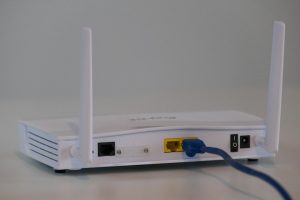
- Router in bridge mode: Turns off router features and passes the connection along.
- Game console or TV bridge: Uses Wi-Fi to feed wired Ethernet ports.
Think of it like a network extension cord. It does not usually create a new network. It extends the one you already have.
Bridge Mode: Best When You Have Two Routers
Bridge mode is most often used with an ISP gateway. That gateway is usually a modem and router in one plastic box. If you add your own router, both devices may try to run the network. That can cause double NAT, port forwarding pain, strict NAT on consoles, and random app issues.
Bridge mode fixes that by making the ISP device act more like a plain modem. Your own router handles Wi-Fi, firewall rules, DHCP, parental controls, and device management.
Use bridge mode when:
- You bought a better router and want it in charge.
- You need cleaner port forwarding for gaming or cameras.
- Your VPN, smart home hub, or NAS keeps acting weird.
- You want one app to manage the whole network.
The catch is that ISP menus are often buried. It drives me crazy that a setting called “bridge mode” can be hidden under “advanced WAN,” followed by a reboot that takes two full minutes. Still, once it works, the network feels much cleaner.
Mesh Systems: Best for Whole Home Wi-Fi
A mesh system uses two or more Wi-Fi nodes to cover a larger place. One node connects to the modem. Other nodes sit around the home and repeat the network. Your phone or laptop moves between them as you walk around.
Mesh is not the same as a bridge, but mesh nodes do bridge traffic back to the main unit. Some use Wi-Fi for that backhaul. Better setups use Ethernet backhaul, which is faster and more stable.
Mesh works well when:
- Your Wi-Fi drops in bedrooms, garages, or upstairs rooms.
- You want one network name across the home.
- You do not want to tune channels by hand.
- You need simple app-based setup.
Mesh can be brilliant. It can also be pricey. If the nodes are placed badly, performance drops fast. A node in a dead zone cannot magically create good signal. Put it halfway between the router and the weak area.
Access Points: Best for Wired, Reliable Expansion
An access point, or AP, adds Wi-Fi to an existing network. It usually connects by Ethernet to your router or switch. The router still manages the network. The AP simply broadcasts Wi-Fi.
This is often the best setup if your house has Ethernet wiring. It avoids the signal loss that can happen with wireless repeaters. A wired AP in a hallway ceiling or office can serve many devices with less drama.
Use an access point when:
- You can run Ethernet to the weak coverage area.
- You want strong Wi-Fi in one specific spot.
- You have a larger home, office, shop, or rental unit.
- You want business-style reliability without replacing everything.
Many routers include an AP mode. That turns off routing features and lets the device act as a Wi-Fi access point. This is handy when reusing an old router.
Bridge Mode vs Mesh vs Access Point
Here is the plain version:
- Bridge mode solves router conflicts. Use it when two routers are stacked.
- Mesh solves whole-home Wi-Fi coverage. Use it when you want simple roaming.
- Access points solve weak Wi-Fi with wired stability. Use them when Ethernet is available.
- Wireless bridges connect distant wired devices without running cable.
If you only remember one thing, remember this: routing and Wi-Fi coverage are separate problems. Bridge mode is about who controls the network. Mesh and APs are about where the Wi-Fi reaches.
Which One Should You Choose?
Pick bridge mode if you have an ISP gateway and a personal router. This avoids double NAT and keeps one device in control.
Pick a mesh system if you want easy coverage across a house and do not want to run cables. It is the cleanest consumer option for many people.
Pick access points if you want speed and stability. Ethernet backhaul usually beats wireless backhaul, especially for streaming, work calls, and gaming.
Pick a wireless bridge if you need to connect a garage, camera, printer, or TV without pulling cable. Just keep the distance realistic. Walls, metal, and floors can hurt the signal.
Common Mistakes to Avoid
- Leaving two routers active: This can create double NAT and odd connection errors.
- Putting mesh nodes too far apart: They need a good signal to repeat a good signal.
- Using old routers blindly: Some only support older Wi-Fi speeds and weak security.
- Skipping Ethernet when available: A wired AP is often better than another wireless node.
An internet bridge is a useful tool, but the right choice depends on the problem. If the issue is router conflict, use bridge mode. If the issue is coverage, use mesh or access points. If the issue is connecting two separated areas, use a bridge. Simple as that.