If your iPhone X has a black spot, back up your phone first, then test the display before paying for a screen replacement. A black spot can be a dead OLED area, pressure damage, liquid damage, or a software glitch pretending to be scary. Start simple. Then decide if repair is worth it.
TLDR: A black spot on an iPhone X is often a hardware problem, especially if it stays in the same place. Try a restart, screenshot test, brightness check, and touch test before booking repair. For example, if 15% of your screen is black and touch fails there, replacement is usually the smart move. If the spot only appears in one app, you may avoid a $100 to $300 repair bill.
What Is That Black Spot?
The iPhone X uses an OLED display. That means each pixel lights itself. Very fancy. Also very dramatic when things go wrong.
A black spot usually means part of the display is no longer showing light. It may look like ink under glass. It may spread slowly. It may sit in one corner like a tiny villain. Sometimes it has purple, green, or white edges.
Common causes include:
- Pressure damage from sitting on the phone.
- Drop damage, even if the glass did not crack.
- Liquid damage inside the display layer.
- OLED burn or pixel failure.
- Loose display connector after a previous repair.
- Software display glitch, rare but possible.
Honestly, it feels rude when the glass looks perfect but the screen still has a black blob. Sadly, the glass and the OLED panel are not the same thing. The pretty outer glass can survive while the display under it gives up.
First Test: Take a Screenshot
This is the easiest trick.
Take a screenshot of your screen. Then send it to another phone, tablet, or computer. Look at it there.
- If the black spot appears in the screenshot, it may be an app or software issue.
- If the black spot does not appear in the screenshot, the display hardware is likely damaged.
This test takes 20 seconds. It can save you money. It also gives you a clean clue before a repair shop starts tossing around scary words.
Second Test: Restart the Phone
Yes, the boring restart. Do it anyway.
For iPhone X:
- Press and hold the Side button and either Volume button.
- Slide to power off.
- Wait 30 seconds.
- Turn it back on.
If the spot is still there during startup, on the lock screen, and inside different apps, it is probably not software. If it vanishes after restart, great. Your phone was just being weird.
Third Test: Check Touch Response
Open Notes. Try drawing through the black spot. Use your finger. Make lines across the area.
What happens?
- Lines break or stop: Touch may be damaged too.
- Touch works but the area stays black: Display pixels may be dead.
- Touch goes wild: You may have ghost touch or digitizer damage.
Ghost touch is when the phone taps things by itself. It opens apps. It types nonsense. It might call your boss. Great fun. Not really.
Fourth Test: Brightness and Color Check
Set brightness to max. Then open a plain white image. Next, open a plain black image. Then try red, green, and blue.
You can use a display test website or a simple image search. Just avoid downloading random junk apps. Some are stuffed with ads and make a five second test take two minutes. It drives me crazy that a “free screen test” app needs three popups before showing a white screen.
Watch the spot. Does it change size? Does it glow at the edges? Does it show color bleeding?
If the spot is sharp and stable, it may be dead pixels. If it looks like liquid spreading, the OLED layer may be damaged. If it grows day by day, repair gets more urgent.

When Diagnostics Are Enough
You may not need a screen replacement right away if:
- The spot is tiny.
- Touch works fine.
- Face ID works.
- The spot is not spreading.
- You plan to upgrade soon.
A tiny black dot near the edge can be annoying but livable. If it covers the keyboard, camera controls, or status bar, that is different. Usability matters.
Think of it like a crack in a car windshield. A tiny chip is one thing. A spiderweb across your view is another.
When You Need Screen Replacement
Replacement is the likely answer if:
- The black spot is growing.
- The screen flickers.
- There are green or white vertical lines.
- Touch fails in that area.
- The phone has ghost touch.
- The screen goes black during use.
The iPhone X display is one unit. Repair shops usually replace the full screen assembly, not just the dark patch. You cannot rub it away. You cannot “reset pixels” with a magic video. Those videos are mostly digital fairy dust.
Your Screen Replacement Options
You have three main routes. Each has pros and pain points.
1. Apple or Apple Authorized Service
This is the safest route for quality. You usually get strong part quality and proper repair handling. If other issues exist, they can check them too.
The downside is price. For an older iPhone X, official repair can feel hard to justify. If the phone is worth around $150 to $250 used, a high repair cost may not make sense.
2. Independent Repair Shop
This is often cheaper and faster. Many shops can replace an iPhone X screen the same day. Some do it in under one hour.
Ask what type of screen they use:
- Soft OLED: Better quality. Closer to original feel.
- Hard OLED: Cheaper. More fragile.
- LCD replacement: Cheapest. Thicker look. Worse contrast.
For an iPhone X, soft OLED is usually the sweet spot. It keeps the deep blacks and nice colors. LCD may work, but it can make the phone feel like it got budget shoes.
3. DIY Screen Replacement
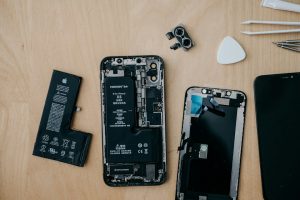
You can replace the screen yourself. Kits are easy to find. The job is not impossible. But it is fiddly.
You deal with tiny screws, fragile cables, adhesive, and Face ID parts. One wrong pull can create a new problem. Suddenly your black spot repair becomes a Face ID funeral.
DIY makes sense if you enjoy repairs and accept risk. If you just want your phone back before lunch, use a shop.
Price Check: Is It Worth Repairing?
Use this simple rule.
If repair costs more than 50% of the phone’s value, think twice. If your iPhone X is worth $180 and the repair is $160, maybe save that cash for a newer model. If the repair is $80 to $120 and the phone works well, fixing it can be smart.
Also check battery health. Go to Settings > Battery > Battery Health. If the battery is below 80%, you may soon need a battery too. Two repairs can change the math fast.
Quick Decision Guide
- Spot appears in screenshots: Check apps and iOS first.
- Spot does not appear in screenshots: Hardware issue likely.
- Small spot, touch works: Monitor it.
- Growing spot: Replace soon.
- Touch failure or ghost touch: Replace now.
- Repair costs too much: Consider upgrading.
Backup Before Anything
Before repair, back up your iPhone. Use iCloud or a computer. Do it before the screen gets worse. A black spot can become a black screen. Then you are stuck guessing your passcode on a dead display, which is a special kind of misery.
Also turn off Find My iPhone only if the repair shop asks and you trust them. Remove private photos or sensitive apps if you want extra peace of mind.
Final Call
Run the screenshot test first. Then test touch, brightness, and color. If the black spot stays fixed and does not show in screenshots, your iPhone X probably needs a screen replacement.
Choose Apple for quality. Choose a trusted local shop for speed and price. Choose DIY only if tiny screws do not scare you.
A black spot is annoying. It is not mysterious forever. Test it, price it, fix it, or retire the phone with honor.