Search is still where many software buying journeys begin. Whether someone is looking for a budgeting app, a project management platform, a PDF editor, or an AI scheduling tool, your application needs to be visible at the exact moment a user is comparing options. Application SEO is the process of optimizing your software’s web presence, marketplace listings, documentation, and product pages so people can discover, trust, and install or purchase it.
TLDR: Application SEO helps your software appear in search engines, app stores, and software marketplaces when users are actively looking for a solution. For example, a small invoicing app that optimized its landing page for “invoice app for freelancers,” improved its screenshots, and added comparison pages increased organic trial signups by 38% in three months. Focus on keyword intent, fast pages, compelling listings, technical SEO, reviews, and educational content. The goal is not just more traffic, but more qualified users who understand why your app solves their problem.
What Makes Application SEO Different?
Traditional SEO often focuses on articles, service pages, or ecommerce products. Application SEO is slightly different because software users usually need more proof before they convert. They want to know what your app does, what platforms it supports, how it compares with alternatives, how pricing works, and whether it is reliable.
This means your SEO strategy should connect discovery with decision making. Ranking for a keyword is useful, but ranking with a page that clearly explains features, benefits, screenshots, reviews, integrations, and use cases is what turns visitors into users.
Start With Search Intent, Not Just Keywords
Keyword research is still essential, but for software, intent matters more than raw volume. A keyword like “best calendar app” may have high traffic, but it is competitive and broad. A keyword like “shared calendar app for remote teams” may bring fewer visitors, but those visitors are more likely to sign up.
Group your keywords into intent categories:
- Problem-aware: “how to manage client invoices,” “reduce meeting no shows,” “organize design feedback”
- Solution-aware: “invoice automation software,” “appointment reminder app,” “feedback management tool”
- Comparison: “best CRM for small agencies,” “Trello alternative,” “Notion vs Asana”
- Transactional: “download time tracking app,” “project management software free trial”
The strongest application SEO strategies create pages for each stage. Blog content can attract problem-aware users, feature pages can support solution-aware searches, and comparison pages can capture high-intent prospects close to conversion.
Optimize Your Core Product Pages
Your homepage and product pages are often the most important SEO assets. They should clearly communicate what the software does within the first few seconds. Avoid vague claims like “work smarter” unless they are supported by specific details. A searcher should immediately understand your category, audience, and primary benefit.
Strong product pages usually include:
- A clear H1: Use language people actually search for, such as “Time Tracking Software for Agencies.”
- Benefit-driven copy: Explain outcomes, not just features.
- Feature sections: Give each major feature enough context to rank for related searches.
- Screenshots or product visuals: Show the interface and reduce uncertainty.
- Social proof: Add testimonials, ratings, customer logos, or usage numbers.
- Calls to action: Make trial, demo, or download steps obvious.
Instead of creating one thin page for every feature, consider building substantial pages around features that match search demand. For example, a project management app might create separate pages for task automation, team workload planning, and client approval workflows.
Use App Store Optimization Alongside SEO
If your software is available in the Apple App Store, Google Play, browser extension stores, or software marketplaces, your web SEO should work together with app store optimization. Many users search directly inside these platforms, and marketplace visibility can influence search behavior outside them.
Pay close attention to your app title, subtitle, description, category, screenshots, preview videos, and reviews. Your title should be clear rather than clever. Your description should mention important use cases naturally, without keyword stuffing. Screenshots should highlight actual value: onboarding, dashboards, reports, collaboration tools, or results users can expect.
Ratings also matter. A product with a 4.7-star average and recent positive reviews will usually convert better than one with a vague description and outdated screenshots. Encourage satisfied users to leave reviews at natural success moments, such as after completing a task, exporting a report, or reaching a milestone.

Create Content That Supports the Buyer Journey
Educational content is especially powerful for software because many users are not ready to buy immediately. They may be researching a workflow, comparing methods, or trying to understand whether a tool is worth adopting. Helpful content builds trust before a sales page ever appears.
Consider creating content such as:
- How-to guides: “How to build a client onboarding workflow”
- Templates: “Free project brief template” or “Bug report template”
- Comparison articles: Honest comparisons between your product and alternatives
- Use case pages: Pages for industries, roles, or team types
- Integration pages: “Connect your CRM with email marketing software”
Templates and calculators are particularly effective because they offer practical value. A payroll app, for instance, might publish a salary calculator or tax deadline checklist. These assets can attract backlinks, repeat visits, and highly relevant organic traffic.
Strengthen Technical SEO
Even the best content can struggle if your site is slow, confusing, or difficult for search engines to crawl. Software websites often include JavaScript-heavy interfaces, dynamic pricing tables, documentation portals, and login-based areas. Make sure public pages are indexable and load quickly.
Important technical checks include:
- Page speed: Compress images, reduce unused scripts, and use caching.
- Mobile usability: Many users research apps on phones even if they later buy on desktop.
- Structured data: Use schema for software applications, reviews, FAQs, and breadcrumbs where appropriate.
- Internal linking: Connect blogs, feature pages, documentation, and pricing pages logically.
- Index control: Prevent duplicate, filtered, or low-value pages from being indexed.
Documentation can also become a major SEO channel. If your help center answers common questions clearly, it may rank for troubleshooting and setup searches. However, documentation should not feel like a dead end. Include links to relevant features, tutorials, and upgrade paths where useful.
Build Trust With Reviews, Comparisons, and Proof
Software decisions involve risk. Users worry about data security, migration effort, pricing surprises, team adoption, and vendor reliability. SEO pages should reduce those doubts.
Add trust signals throughout your site. Show security standards, privacy information, uptime statistics, customer stories, and support options. If your application serves businesses, case studies can be particularly persuasive. A case study that says “Company X reduced reporting time by 42%” is more memorable than a general testimonial saying “Great product.”
Comparison pages also work well when they are fair and useful. Instead of attacking competitors, explain differences in audience, pricing, features, integrations, and setup. Searchers using comparison queries are often close to choosing; your job is to help them make a confident decision.
Measure the Right SEO Metrics
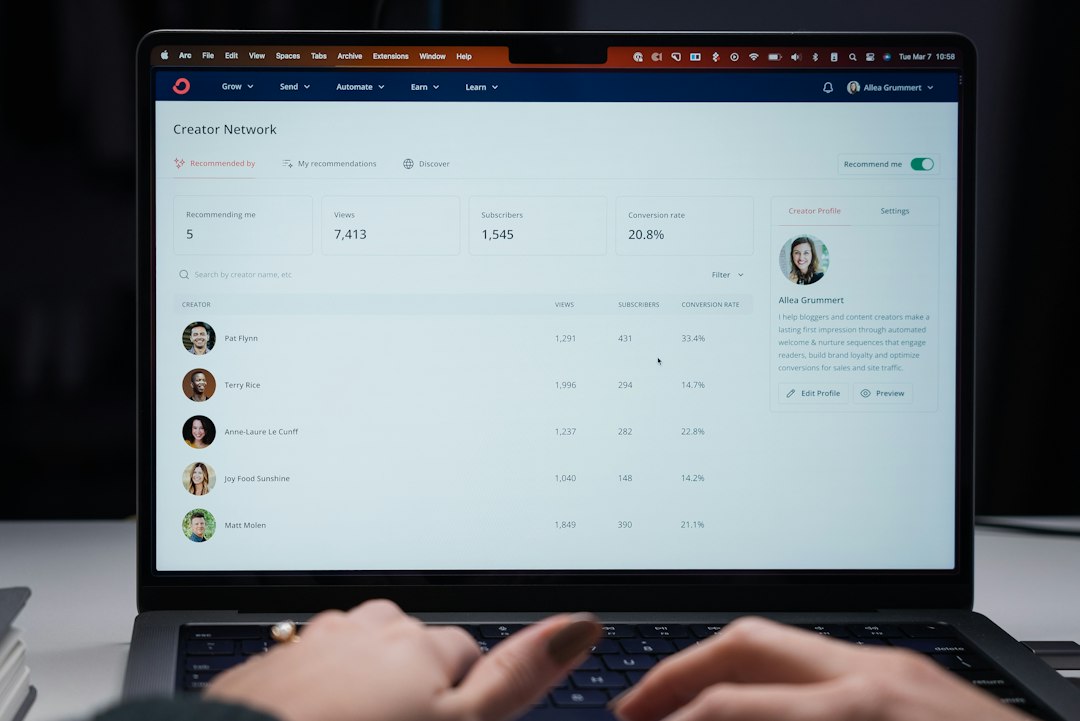
Traffic alone does not prove success. Application SEO should be measured by how well it supports signups, downloads, demos, activation, and revenue. A blog post with 20,000 monthly visits may be less valuable than a feature page with 800 visits and a 12% trial conversion rate.
Track metrics such as:
- Organic signups or downloads
- Trial-to-paid conversion rate
- Keyword rankings for high-intent terms
- Conversion rate by landing page
- App store listing views and install rate
- Review quantity, rating average, and review recency
Connect analytics tools with your CRM or product analytics platform when possible. This helps you see which pages attract users who actually activate and stay, not just visitors who browse and leave.
Keep Improving After Launch
Application SEO is not a one-time checklist. Your market changes, competitors update their positioning, new integrations appear, and users search in new ways. Review your rankings, content performance, conversion rates, and app store data regularly.
Update old articles, refresh screenshots, add new FAQs, improve internal links, and expand pages that already show promise. If a feature page ranks on page two, adding examples, visuals, testimonials, and clearer copy may push it higher. If an app listing gets impressions but few installs, test new screenshots or a sharper opening description.
The best application SEO combines technical precision with user empathy. Search engines need to understand your software, but users need to believe it will solve their problem. When your pages answer real questions, show the product clearly, and guide visitors toward a useful next step, SEO becomes more than a traffic channel. It becomes a reliable growth engine for your software.