If you’ve ever dreamed of spreading your business online without needing to learn complex coding or hire a team of tech wizards, you’re in luck. There’s a tool that makes digital marketing easy for anyone—it’s called EasyWeb. Whether you’re a small business owner, a freelancer, or just someone with a side hustle, you can use EasyWeb to level up your marketing game.
TLDR:
Yes, marketing with EasyWeb is absolutely possible. In fact, it’s made for that! You can build websites, create landing pages, and capture leads without knowing a single line of code. This guide will show you how to use EasyWeb step-by-step to boost your visibility and drive more sales.
What is EasyWeb?
EasyWeb is a drag-and-drop website builder that focuses on making things simple. It’s great for people who want to create beautiful websites fast. No coding. No complicated design tools.
But it’s more than just a page builder. EasyWeb has built-in tools for:
- Email marketing
- Lead generation
- Analytics and tracking
<liSEO optimization
That makes it perfect for digital marketing!
Why Use EasyWeb for Marketing?
Let’s face it—marketing online can be tough. There are dozens of platforms, tools, and apps to choose from. EasyWeb saves you time and money by combining many of those tools into one.
Here’s what makes EasyWeb stand out:
- Built-in templates: Get started fast with pre-built landing pages.
- Mobile responsive: Your site will look great on phones and tablets.
- SEO-friendly: EasyWeb helps your site show up on Google.
- Email integration: Collect emails and send newsletters directly.
- No coding required: Just click, drag, and drop.
Still questioning if EasyWeb can really handle your marketing needs? Let’s walk through a complete guide to using it like a pro.
Step-by-Step: Using EasyWeb to Boost Your Marketing
1. Start with Your Goal
Think about what you want to achieve. Do you want to:
- Grow your email list?
- Sell a product or service?
- Promote an event?
- Showcase your portfolio?
Your goal will shape how you use EasyWeb.
2. Choose the Right Template
EasyWeb gives you access to dozens of templates. Pick one that fits your message. Options include:
- Product landing pages
- Consulting service pages
- Event promotions
- E-book giveaways
You can customize any template with your own text, photos, and colors.
3. Customize the Content
This is where the fun starts. Using the drag-and-drop editor, you can:
- Add text boxes and headlines
- Insert photos or videos
- Place buttons to drive action (like “Buy Now” or “Contact Me”)
- Embed forms to collect emails
Tip: Make sure to use clear headlines and strong calls to action. Tell your visitors exactly what they need to do next!
4. Go Mobile
Over half of web traffic comes from mobile devices. Luckily, every EasyWeb page is mobile-optimized by default. Still, you should test your site on a phone just to make sure everything looks great.
5. Collect Leads
Add a form to capture your visitors’ names and emails. This is a classic tool for building an email list. You can even offer a free download or discount in exchange for the sign-up.
Once you’ve got leads, EasyWeb allows you to send automated emails or newsletters directly from the platform!
Extra Marketing Features
1. SEO Tools
EasyWeb comes with built-in SEO options. You can:
- Edit your page title
- Write a meta description
- Add image alt texts
This helps your page show up better on search engines like Google.
2. Analytics
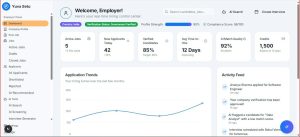
Want to know how many people visit your site, where they come from, and what they click? EasyWeb has a dashboard for that. No need to install programs or mess with code.

3. Social Media Integration
You can link your social accounts, add share buttons, and even embed your Instagram feed to give your page more personality. More connection = more customers.
Real-Life Example
Meet Sarah. She’s a yoga teacher who wants to sell online classes. She uses EasyWeb to:
- Build a landing page with her classes
- Add a form to capture emails
- Send weekly newsletters with tips and class updates
Within two months, Sarah doubles her class sign-ups and spends zero dollars on an outside developer. That’s the kind of magic you can make with EasyWeb.
Tips to Make the Most of EasyWeb
- Keep it simple: Don’t overload your page with too much information.
- Use strong images: A picture really is worth a thousand words.
- Test everything: Always preview your page on desktop and mobile.
- Update often: Keep your content fresh to keep visitors coming back.
Who is EasyWeb Best For?
If you’re wondering if EasyWeb is a good fit for you, here’s a quick list of people who love it:
- Freelancers and consultants
- Small business owners
- Personal brands and influencers
- Online shops and service providers
- Coaches, teachers, and creatives
Whether you’re offering dog walking services or selling handmade candles, you can turn EasyWeb into your digital storefront.
Conclusion
So, can we do marketing with the help of EasyWeb? The answer is a big, happy YES! It’s simple, powerful, and made for people who want results without hassle.
You don’t need to be a tech expert to build something amazing. With EasyWeb, you can launch your brand into the spotlight using tools that are both fun and effective. Give it a try—you might be surprised at just how far it can take you.
Happy marketing!